news
Updates
09 Mar 2026
[v249] - Patch Notes (New Contents & System Updates)

Table of Content
- Skill Ring System [NEW]Plasma Heart [NEW]
- Enhancement Improvement
- UI Improvements
↪Friends and Party UI Improvements
↪UI Improvements and Bug Fixes
↪In-game Web Browser
↪VIP Sauna Improvements
↪Valuable UI Improvements
- My Home Improvements
Boss System [UPDATED]- Epic Dungeon Improvements
Epic Dungeon: Nightmare Paradise [NEW]- Union Champion Improvements
Monster Collection [UPDATED]World Archive [NEW]- Maple Chronicle: Resistance
Skill Ring System
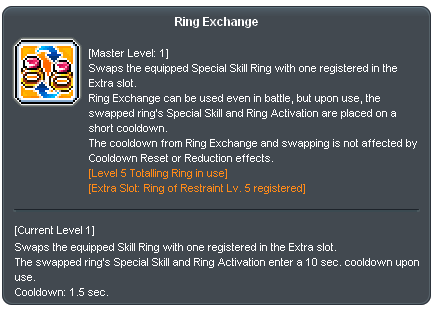
- A new skill, Ring Exchange has been newly added.
- Ring Exchange allows you to swap the registered reserve Special Skill Ring with the currently equipped Special Skill Ring.
- Ring activation and Special Skill Ring skills will be temporarily unavailable for a short duration after swapping.
- Ring Exchange can only be used when a Special Skill Ring is equipped and a ring has been registered in the reserve slot.
- Ring Exchange can be accessed via the Beginner Skill tab in the Skill UI.
- Cooldowns incurred from ring exchanges and swaps will not be affected by Cooldown Reset or Cooldown Reduction effects.

- A Special Skill Ring reserve slot has been newly added to the Equipment UI.
- The Special Skill Ring reserve slot can be accessed by clicking the button located at the lower right corner of the equipped Special Skill Ring slot.
- Drag a Special Skill Ring from your Inventory into the reserve slot to register it.
- Double-clicking a registered ring or dragging it back to your Inventory will deregister it.
- Only untradeable items can be registered in the reserve Special Skill Ring slot.
- Skill Rings that do not have a separate distribution location cannot be equipped in the Special Skill Ring Reserve Slot.
- Skill Rings that do not have a separate distribution location cannot be used with Ring Exchange.
- A note has been added to the description tooltip of each ring to indicate that it cannot be registered in the reserve slot or used with Ring Exchange.
[Go to Table of Content]
Plasma Heart
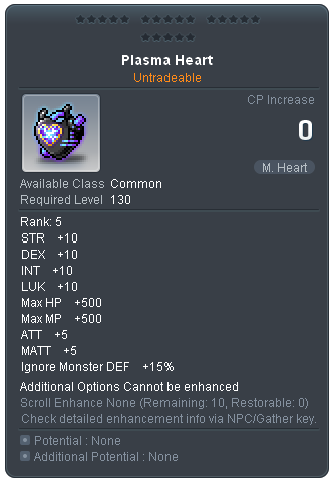
- A new item, Plasma Heart has been newly added.
- Plasma Heart - A new level 130 Mechanical Heart item that can be upgraded to Star Force 20.
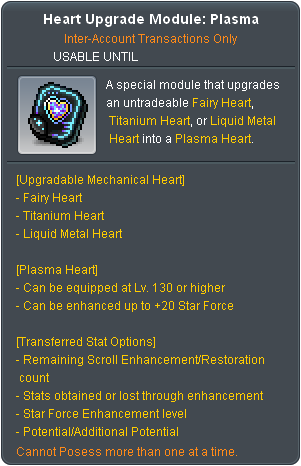
- Heart Upgrade Module: Plasma - Untradeable permanent level limit 100~120 mechanical heart item.
- Option transfer feature has been added when upgrading the Plasma Heart.
- The remaining Scroll Enhancement count and the number of recoverable enhancements
- Star Force enhancement level
- Stats gained or lost through enhancement
- Potential
- Additional Potential
- Heart Upgrade Module: Plasma can be applied to Fairy Hearts, Titanium Hearts, and Liquid Metal Hearts.
[Go to Table of Content]
Enhancement Improvements
- The Carved Seal System has been removed.
- Except when fixed Potential or Additional Potential is granted, all Potential and Additional Potential will now be awarded with three lines. For example,
- When using Regular/Choice/Equality Cube on a 2 Potential lines equipment, the Potential line will increase to 3 lines.
- When using Hexa Cube on a 2 Potential lines equipment, 6 Potential lines will appear and up to 3 can be selected.
- When using Uni Cube, the number of options will not change.
- Items that previously had two lines of Potential or Additional Potential will now have three lines after a reset.
- Power Elixir quantity are depends on the type of Carved Seals used.
- Carved Seal items will no longer drop from Elite Monsters.
- Carved Seal items will no longer be available from the "Rare Treasure Chest" dropped by Elite Bosses.
- Carved Seal items will no longer be available from various Exploration Chests.
- Carved Seal items will no longer be available when exchanging Cube Fragments.
- Silver Additional Carving Stamp can no longer be obtained from Golden Apple.
- The Carved Golden Seal will be removed from the Union Coin Shop sale list.
- The Carved Golden Seal and Special Additional Carved Seal will be removed from the sale lists in the Hideout Coin Shop and Challenger’s Store.
- Some updates and improvements have been made to the Enhancement UI.
- The Enhancement UI will now reopen at the same position where it was last closed.
- Opening the Enhancement UI will no longer reposition or alter the status of the Equipment and Inventory UIs.
- The size of the left tab has been reduced.
- The selection method for Star Catch and Safeguard during Star Force enhancement has been changed from a checkbox to a switch.
- When a scroll with a random value successfully enhances an item, the increased value will now be temporarily shown during the enhancement success cutscene.
- The default display option for Additional Stats values has been changed to disable the detailed information.
- When resetting Additional Stats, Potential, or Additional Potential, the resulting values will now be previewed at the start of the enhancement success cutscene.
- A cube-specific inventory has been added for use when resetting Potential or Additional Potential.
- The guidance text format for resetting Potential or Additional Potential will now be standardized.
- The name Special Skill Ring Enhancement Level Exchange will be changed to Ring Enhancement Level Exchange.

[Go to Table of Content]
UI Improvements
Friends & Party UI Improvements
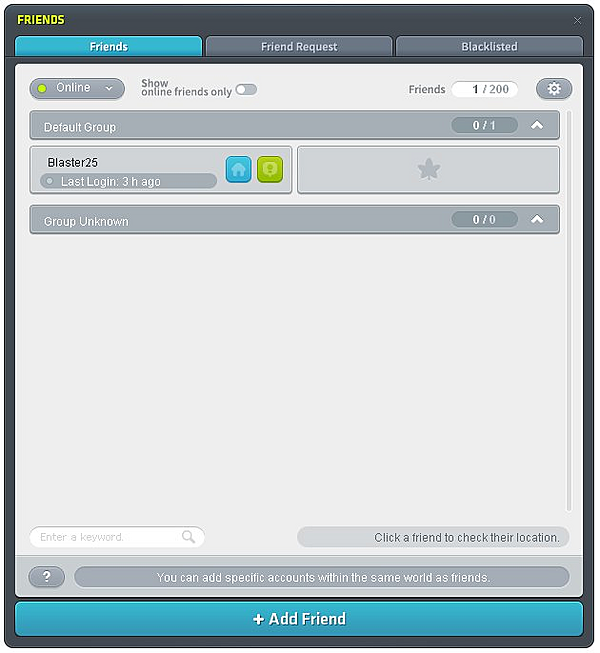
- Buddy term has been removed and replaced with Friends.
- The Friends UI and Party UI have been separated into individual UIs and updated.
- The maximum number of friends listed will be expanded from 100 to 200.
- The maximum number of friends allowed will be 200.
- The Friends List expansion feature will be removed, and the default will now allow the maximum number of friends to be registered.
- A friend search function has been added to the Friends UI.
- You can search by character name, nickname, or connected character in the Friends list. Only friends that include the search term will appear in the list.
- Character friends has been removed.
- After the update, friends previously registered as Character Friends will be removed from the list.
- The Add Character Friend feature will be removed. Adding a friend will now automatically add all characters on the same world under the account.
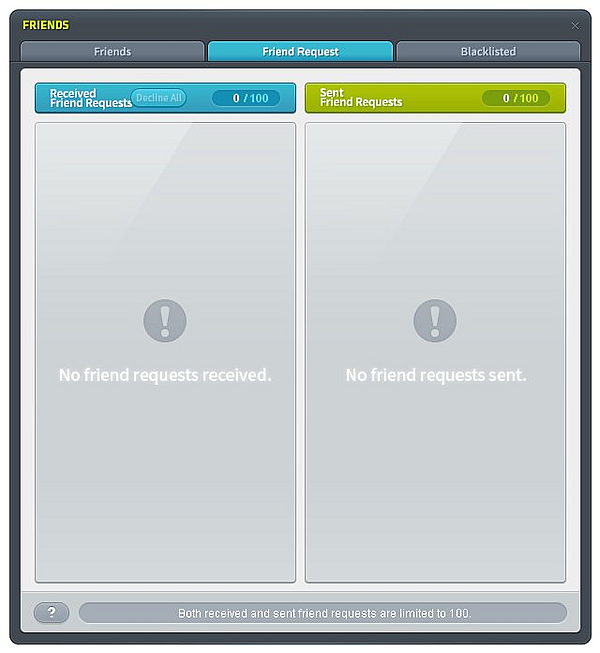
- A Friend Request List has been added to the Friends UI.
- A list displaying up to 100 received friend requests has been added. You can review and accept or decline requests from this list.
- A list displaying up to 100 sent friend requests has been added. You can review sent requests and cancel any that have not yet been accepted.
- Away status has been added.
- If there is no mouse or keyboard input for 30 minutes or more, or if you are in the Cash Shop or Auction House, your status will appear as Away in other players’ Friends UI or Party UI.
- The Party UI has been updated to allow instant viewing of party members’ Combat Power.
- The Party UI has been updated to display the online status of party members.
- You can now see if your party members are online, offline, or away in the Party UI.
- Party members who are online but in a different channel or map will now be displayed separately.
- You can now view a friend’s or party member’s location by clicking on them in the Friends UI or Party UI.
- You can now see the map your friend or party member is in, even on a different channel. This feature is unavailable if they are participating in a World Unified Boss or World Party Quest.
- The group order in the Friends UI will now be saved separately for each world.
- The group order in the Friends UI that previously saved per character, will now be saved and applied per world.
- After logging in following the update, previously set group orders will no longer be applied and will instead be reordered alphabetically.
[Go to Table of Content]
UI Improvements and Bug Fixes
- You can now create characters without a daily limit, up to the maximum number of available character slots.
- An option to adjust chat window transparency has been added.
- Added the Transparency Application and Adjustment function to the Chat Window Settings.
- When this option is enabled, the Chat Window background will be displayed with the specified transparency level. Upon hovering the mouse cursor over the Chat Window, the transparency will be temporarily disabled.
- When the Transparency option is enabled, the font will be changed to a dedicated outlined font to improve readability.
- The Kaiser Morph Gauge UI has been updated.
- A scroll function has been added to the Character Selection Screen Theme UI.
- The open/close settings for the Search and Favorites windows within the World Map UI will now be saved.
- If there are rewards available to be claimed in the Achievement UI, a reward notification icon will now be displayed on the corresponding Achievement category. When selecting an Achievement category, all claimable rewards will be displayed at the top.
- The scroll position will no longer be reset when switching between the In Progress, Can Start, and Complete tabs in the Quest UI.
- Lengthy quest names displayed in the Quest UI and Navigation UI will now be displayed with ellipses. The full quest name will be displayed upon hovering the mouse cursor over them.
- When using an EXP Coupon, a confirmation prompt will now be displayed asking whether to use the sequence, if a sequence containing an EXP Coupon is available.
- The minimum transparency limit for your character's Skill effects has been decreased.
- The Ability reset function performed by pressing the Space Bar has been improved.
- When activating a Buff Sequence while a buff within the sequence is already applied, an option to exclude the already applied buff has been added.
- The Specialty Skill Crafting UI has been improved to display all possible obtainable results when there are multiple items that can be obtained upon a successful craft.
UI Improvements
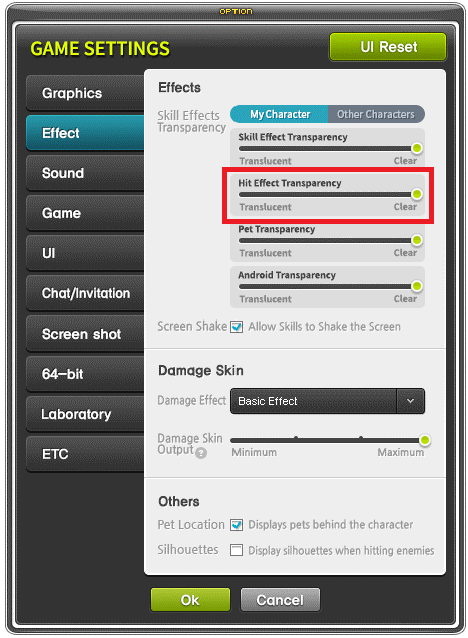
- The Game Settings UI has been improved, allowing Skill Effect transparency and Hit Effect transparency to be adjusted separately.
- When applying the Hit Effect transparency option in the Game Settings UI, Hit Effects that were previously displayed separately will no longer overlap with one another.
- Hovering the mouse cursor over an Illusion Ring will now display the appearance of the Illusion Ring that you have transformed into.
- Pressing Ctrl + A in text input fields, such as the Chat Window, will now select all entered text.
- When listing items for sale in the Maple Auction, the quantity will now be automatically filled in based on the number of items owned in the same slot.
- Items that are incompatible with your character's gender can now be previewed in the Maple Auction.
- Pets will no longer be displayed upon entering the Foggy Forest Training Center.
- Notification windows will no longer appear during Boss battles. The details can be viewed in the Integrated Notification Window after exiting the battle.
- Chat and invitation requests will no longer occur during Boss battles unless disabled in the Game Settings UI.
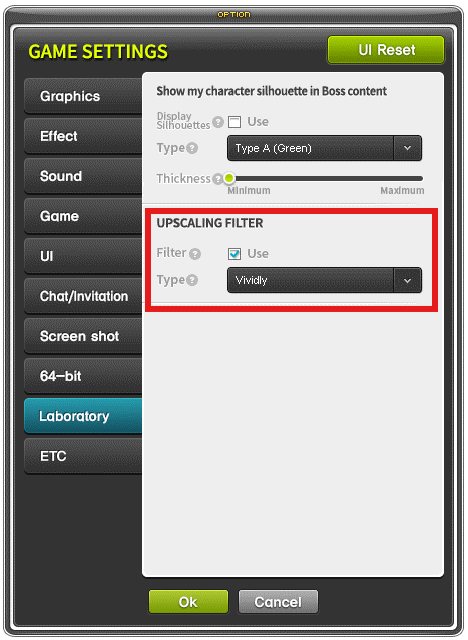
- A new Upscaling Filter option has been added to the Game Settings UI.
- Selecting "Vivid" from the Lab Upscaling Filter type will now preserve colors while providing a smoother display compared to the previous "Vivid" option.
- When searching for the location of a monster that is not displayed on the World Map via the Monster Collection, the World Map UI will no longer appear.
- When clicking on a map, NPC, or monster that cannot be displayed on the World Map in the Quest UI, the World Map will no longer open, and only the relevant information will be provided.
- The images displayed in certain notification windows during the login process will be replaced.
- A Quick Travel shortcut key has been added, and the Quick Travel button has been enlarged.
- If you log out and reconnect with the Minimized Guide UI disabled, the Minimized Guide UI will no longer automatically appear upon reconnecting.
- However, if a Main Quest or Job Change Quest is available to start or is currently in progress, the Minimized Guide UI will still appear upon logging in.
- The crafting probability text displayed in the Professional Skill UI has been changed to reflect the acquisition probability upon a successful craft.
- Sequences will no longer be usable while Violetta's Lie Detector Test is active.
- Items whose appearance has been changed via the Fusion Anvil in the Maple Auction will now display an Anvil icon.
- Additional information will now be displayed in the Return Scroll Option Selection UI when no stat changes have occurred.
- The Item Drop Rate tooltip in the Character Information Window will now include descriptions for certain penalties.
- A system message will now be displayed when a Sequence key is entered in a Hotkey setting outside of Boss content.
- Certain custom background animation effects will now be displayed in the Equipment UI.
- The design of the confirmation window displayed when attempting to enhance via Star Force or Order Scrolls in the Unified Enhancement UI will be updated.
- When placing a Cube Chair via the Bag UI, the placement method will now be identical to that of placing a Cube Chair through the Installation tab in the Inventory UI.
- The display position of the Buff Favorites UI will now be saved separately by resolution and character.
- Event notices can now be immediately accessed by clicking the "?" button in each event UI.
- Channel switching will now be available on the World Integrated Event Map.
- When acquiring a gem while the Sunday Maple Treasure Hunter EXP Increase benefit is active, a message will now display in the chat window informing you that the relevant benefit is being applied.
- Improved the guidance displayed after using the Golden Strawberry Farm.
- Improved the event list so that events, coin shops, and cash events can now be viewed through separate tabs.
- The Ascent skill can now be used up to three times at the Golden Tomato Farm.
- Fixed an issue where ranking information could not be viewed outside of the ranking settlement period on the Ghost Park job leaderboard.
- The Boss Reward UI name has been changed to "BOSS REWARD".
- Fixed an issue where pressing Enter to interact with the Chat Window UI after a character's death would prevent further interaction.
- Fixed an issue where deleted Pet Skills were still being displayed in Pet Skill tooltips.
- Fixed an issue where character images displayed in the Champion's Protection UI and Burning Beyond UI were not being affected by the UI transparency feature during battle.
- Fixed an issue where the job descriptions for Shadower and Night Lord in the "Skip Job Story" feature were displayed awkwardly.
- Fixed an issue where the positions of certain UI elements would change upon restarting the client.
- Fixed an issue where scrolling would behave abnormally when moving around the map after opening the NPC list on the Minimap.
- Fixed an issue where the "Sealed Genesis Weapon Box" was being displayed in the reward list for Black Mage (Hard) in the Boss tab of the Guide UI.
- Fixed an issue where players who reached the required level to handle a new Union Artifact Crystal by leveling up an Artifact in the World Integrated Channel were unable to handle it immediately.
- Fixed an issue where changes to an Android's name in the Android naming UI were not immediately reflected.
- Fixed an issue where expired items would disappear when being sold or repurchased in the Shop UI.
- Fixed an issue where the maximum number of uses for Pet Equipment Scrolls used in the Unified Enhancement UI would occasionally be displayed incorrectly.
- Fixed an issue where certain letters in the store name would not be displayed upon opening the Android Store.
- Fixed an issue where the scroll position would reset when selling an item after dragging the scroll bar in the Inventory area of the Shop UI.
- Item tooltips will now display the remaining stock quantity for shop items with limited inventory.
- Upon purchasing an item from the shop UI, the scroll bar will now automatically navigate to the purchased item's location, and a new acquisition indicator will be displayed.
- Fixed an issue where the equip icons for arrows and spears would display incorrectly on other items in the shop UI.
- Fixed an issue where equipping the Sealed Genesis Spear, Sword or Genesis Spear, Sword would display a lower combat power value than intended in the character information UI.
- Fixed an issue where the click range for NPC names in the quest information window was inaccurate.
- Fixed an issue where the cursor in the secondary password input window would occasionally not align with the mouse position during the login phase.
- Fixed an issue where the icon and slot sizes of items listed on Maple Auction would sometimes not match.
- Fixed an issue where quest information would disappear when switching between minimized and maximized modes while following navigation guidance for a quest.
- Fixed an issue where the experience gauge would display an incorrect colour.
- Fixed an issue where pressing the Genesis Mode entry button in the Von Leon entry UI would not respond for non-party leaders.
- Fixed an issue where a disassembled V-Core would appear to remain after performing Free Class Advancement immediately following its disassembly.
- Fixed an issue where the experience gain effect from an opponent's Combo Kill Orb, Elite Champion, or Elite Boss Orb would incorrectly display in the Personalization Field.
- Fixed an issue where item or skill tooltips would sometimes not display in the Buff Sequence UI.
- Fixed an issue where the deletion pending notification for Zero characters would display in an incorrect location on the character selection screen.
- Adjusted the character image display area in the Prism Colour Restore confirmation window.
- Fixed an issue where a friend request added to the blacklist would be automatically removed upon reconnecting if the request had been accepted.
- Fixed an issue where the Guild Contribution acquisition limit would display as the daily contribution amount instead of the weekly amount.
- Fixed an issue where the Reserve slot would display the previous level upon the Reserve Special Skill Ring's level increasing.
- Fixed an issue where a pet equipped with a Luna Illusion appearance purchased from the Cash Shop would not display the changed appearance when equipped.
- Fixed an issue where double-clicking the Pepe monster in the Monster Collection would not display its location on the world map.
- Fixed an issue where the cosmetic and hair information locations for Alpha and Beta did not match the correct gender during Zero character creation.
- Fixed an issue where the increased stats from Star Force on previously destroyed items would sometimes display as increased stats from scrolls.
- Fixed an issue where the notification window displayed upon connecting to the game would sometimes appear blurry.
- Fixed an issue where the achievement rank would display incorrectly when the achievement score exceeded a certain threshold in the Maple Achievement UI.
- Fixed an issue where the pet speech bubble would display in a fixed position when climbing a ladder or rope in the Cash Shop or Maple Auction preview window.
- Fixed an issue where the resulting item would appear before the cutscene had finished when using Maple Royal Style Coupons consecutively.
- Fixed an issue where changes to the "Automatically Use Pet Potion When HP is Consumed by a Skill" option in the Pet tab of the Equipment UI would not be saved under certain circumstances.
- Fixed an issue where the acquisition indicator for new items obtained from synthesising Masterpieces and Premium Masterpieces would sometimes not appear.
- Fixed an issue where the X button would not disappear when deleting all entered text using the Backspace key in the Quest UI search bar.
- Fixed an issue where the background image on the Adventurer character creation screen would display incorrectly.
- Fixed an issue where the scrollable area in the Medal UI would display incorrectly.
- Fixed an issue where some weapon effects would display behind the character's class insignia on the character selection screen, causing them to appear incorrectly.
- Fixed an issue where the character's level during development would display as the level of an earlier-listed character of the same class in the class development status UI on the character selection screen.
- Fixed an issue where registering a skill that cannot be added to a buff sequence would display a message stating that the skill cannot be registered to the skill sequence.
- Fixed an issue where skill icons would display incorrectly when selecting a buff favourite or a hyper skill that cannot be registered to a sequence.
- Fixed an issue where skill icons would display incorrectly when selecting Hyper Skills that cannot be registered to Buff Favourites or Sequences.
- Fixed an issue where coins displayed in the Pawn Shop UI would appear incorrectly.
- Fixed an issue where the new item effect would not display in the inventory when acquiring a new item identical to a currently equipped cosmetic item.
- Fixed an issue where the screen would briefly display incorrectly when moving between maps while using Smart AI Correction.
- Fixed an issue where the navigation destination registered on a previous character would be set as the navigation destination when logging in with a different character.
- Fixed an issue where VIP Sauna related UI would display in the Maple Auction preview window under certain circumstances.
- Fixed an issue where the Auto Potion Use settings in the Pet tab of the Equipment UI would sometimes not be saved when set to 95% or 0%.
- Fixed an issue where resizing windows with the mouse would sometimes not function correctly.
- Fixed an issue where characters would not blink in the Cash Shop and Maple Auction preview windows.
- Fixed an issue where other actions could be performed while an item enhancement was in progress in the Enhancement UI.
- Fixed an issue where random portals that were no longer available after reaching a certain level would still be displayed.
- Fixed an issue where UI positions would be incorrectly set when the resolution changed after logging in or returning to the field from the Cash Shop or Maple Auction.
- Fixed an issue where scrolling images would sometimes display incorrectly when selecting Star Force or Soul Weapon in the Integrated Enhancement UI.
- Fixed an issue where the increased value would sometimes display incorrectly when using a Star Force Enhancement Ticket in the Integrated Enhancement UI.
- Fixed an issue where some skill effects would display in Direction Mode after clearing Floor 50 of The Seed, the Tower of the Undersea.
- Fixed an issue where the guidance text in the Skill Sequence UI would display incorrectly.
- Fixed an issue where the Advanced Weapon Refining and Advanced Accessory Enhancement skills could not be registered with Elixirs in the Buff Sequence if Alchemy had not been learned.
- Fixed an issue where the end-of-event pop-up UI would not appear in the Auction or Cash Shop for some events.
- Fixed an issue where an error message would incorrectly report insufficient memory when the client failed to load.
- When pressing the Easy Access UI and Enter key on the World Select screen, the channel selection UI for the world selected from the world list will now be displayed.
- Fixed an issue where some particle effects in the background of the Angelic Buster and Khali character creation screens would display incorrectly.
- Fixed an issue where changing a beauty with a Freestyle Coupon applied in the Beauty Room while using a Zero character would display an image that did not match the current tag state.
- Fixed an issue where reopening the Character Preset UI after attempting to apply an Individual Preset Change identical to the character's current state would not open the current preset.
- Fixed an issue where certain special characters entered incorrectly in the chat window would fail to register.
- Fixed an issue where mouse scrolling would not function properly in some areas on the left side of the Storage UI.
UI Bug Fixes
[Go to Table of Content]
In-game Web Browser
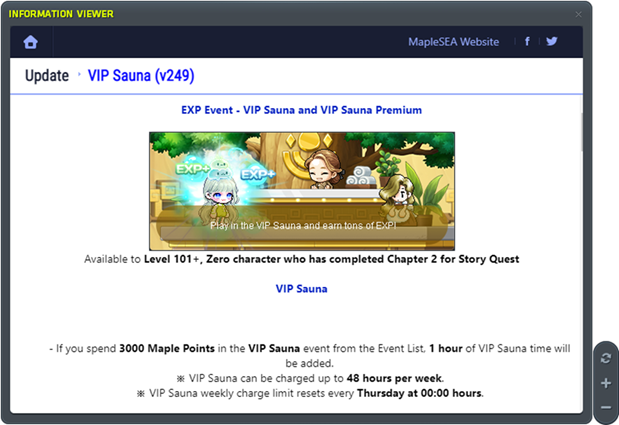
- Clicking the "?" icon for each event in the event list will now open the Information Viewer, displaying each event's web page within the in-game browser instead of opening it externally.
- The left and right arrow keys can now be used to navigate between events within the in-game web browser.
- Refresh, zoom in, and zoom out functions are now available via the buttons located at the bottom right.
- Zoom in is possible up to 200%, and each press of the + button zooms in by 0.25x.
- Zooming out below 100% is not supported.
[Go to Table of Content]
VIP Sauna Improvements
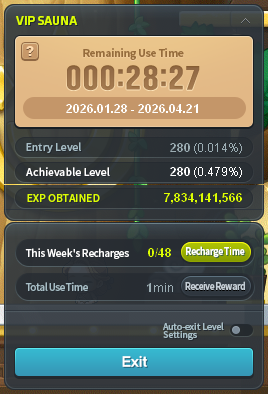
- Exists in two versions: external (outside VIP Sauna) and internal (inside VIP Sauna).
- Clicking the "?" icon will display the event guide.
- Recharge section showing the quantity used and limit for the player per week.
- Clicking Recharge Time button will display the Recharge UI
- A toggle function has been added to enable Auto-exit after setting the desired level threshold.
Main UI
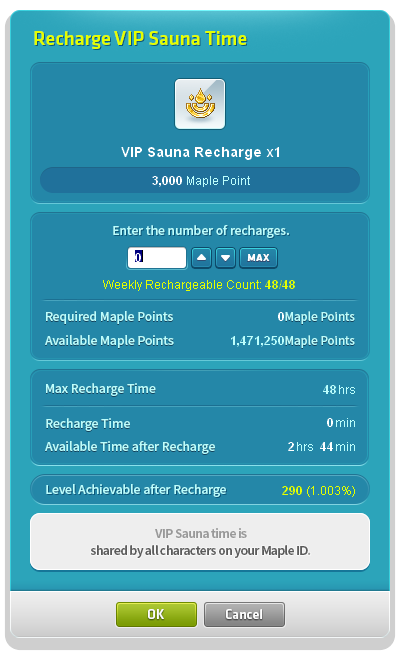
- Exists in two versions: Maple Points and VIP Sauna Pass.
- Clicking the Recharge Time button in the main UI opens the Recharge UI using Maple Points.
- Clicking the VIP Sauna Pass item opens the Recharge UI.
- The number of recharges to be made at once can now be specified by setting the UP and DOWN arrow button.
- Information on the maximum recharge count, recharge duration, retention period after recharge, and the level achievable after recharging will now be displayed.
Recharge UI
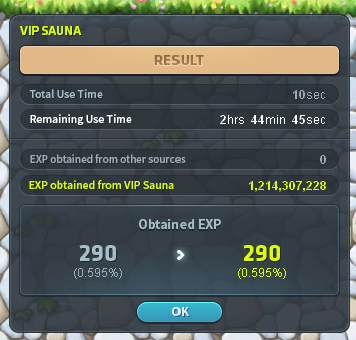
- Upon exiting the VIP Sauna map, a results window will now be displayed showing level and EXP changes before and after the session.
VIP Sauna Results Window
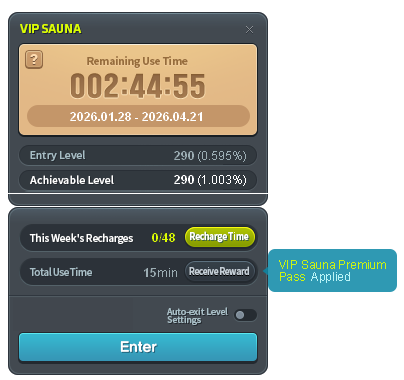
- Similar to normal version, just have additional indication of VIP Sauna Premium Pass
- The indicator will point to Receive Reward as VIP Sauna Premium Pass user have extra rewards
VIP Sauna Premium Pass - Main UI
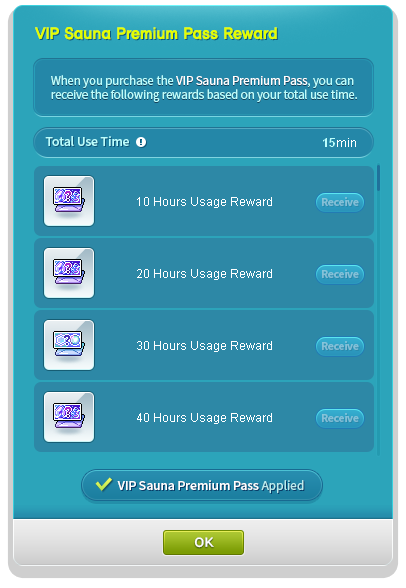
- The UI will open upon clicking the "Receive Rewards" button in the main UI.
- The top of the UI will display a notification indicating that rewards are available upon purchasing a VIP Sauna Premium Pass, along with the accumulated usage time.
- The UI size is set to display four items at a glance, with a scroll bar added to allow all nine rewards to be viewed
- A 'Receive' button has been added to the right of each item, which changes function depending on whether the pass has been purchased, the required accumulated time has been reached, or the reward has already been claimed.
VIP Sauna Premium Pass - Reward Claim UI
[Go to Table of Content]
Valuable UI Improvements
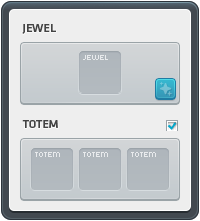
- You can now directly enhance your Jewel equipment from the Equipment Inventory > Valuable UI.
- Upon opening the Jewel Reinforcement UI, a random dialogue will now be displayed with a 30% probability based on your affinity with NPC Innis.
UI Design Changes
[Go to Table of Content]
My Home Improvements
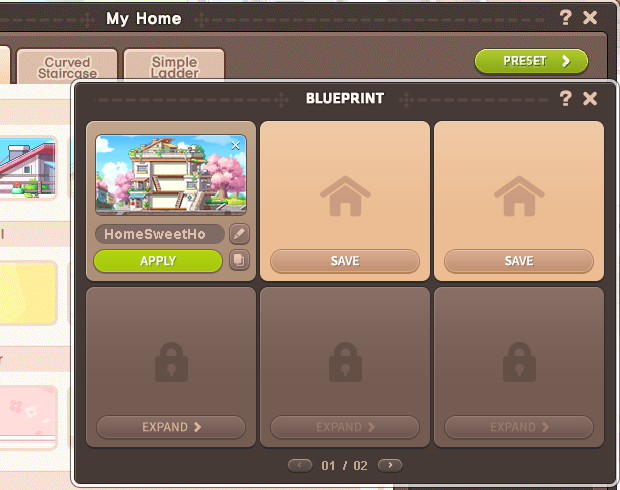
- A My Home Furniture Preset feature has been added.
- 3 basic batch presets are provided by default.
- Each preset stores architecture, structure, and arranged furniture information together.
- The friend list limit has been increased from 50 to 200 players.
- My Home Construction resizing has been added.
- Resizing the My Home Construction will reset the placement of any furniture that has been placed.
- You can save any rearranged or placed furniture using the Preset function.
- The overall building size has been expanded.
- The height of some wall cabinets has been adjusted.
- New furniture has been added to the Regular Shopping Bundle.
- 5 new furniture items have been added for each of the Mushroom House, Ethnic, Antique, and Terrace House themes respectively.
- The icons for poster furniture initially added to My Home have been updated to display the actual poster image.
- As the My Home construction Y-axis height has been increased from 6 to 8 grids, the Y-axis of some furniture has also been readjusted accordingly.
- My Home furniture can be obtained as drops from the following bosses.
- Lotus (Hard, Extreme):
 Orchid Rabbit Doll Cushion
 - Chosen Serene (Extreme):
 Divine Sword Wall Decoration
 - Black Mage (Extreme):
 Black Mage's Mirror
 - Gatekeeper Kalos (Extreme):
 Kalos Ceiling Fan
 - Carling (Normal, Hard, Extreme):
 Carling Canopy Bed
 - Limbo (Normal, Hard):
 Abyssal Window
 - Baldrix (Normal, Hard):
 Blue Magic Fireplace
[Go to Table of Content]
Boss System Updates

- The weekly boss kill limit per character will now be limited to 12.
- Once all 12 weekly bosses have been defeated, you will no longer be able to challenge them.
- Leaving a weekly boss battle while it is in progress will prevent you from entering another weekly boss battle until the current one has concluded.
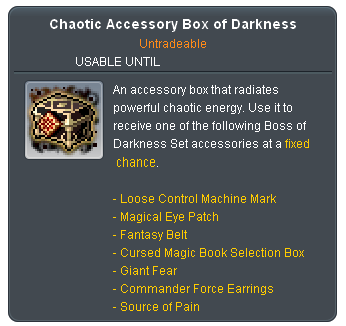
- A new boss monster reward, the "Chaotic Accessory Box of Darkness," has been added.
- Upon use, one of the following items will be obtained at a set probability:
- Loose Control Machine Mark (cannot be exchanged once equipped)
- Magical Eye Patch (cannot be exchanged once equipped)
- Fantasy Belt (cannot be exchanged once equipped)
- Cursed Magic Book Selection Box (non-exchangeable, valid for 7 days)
- Giant Fear (cannot be exchanged when equipped)
- Commander Force Earrings (cannot be exchanged once equipped)
- Source of Pain (cannot be exchanged when equipped)
- Can be obtained from the following boss monsters.
- Carling (Normal, Hard, Extreme)
- Limbo (Normal, Hard)
- Baldrix (Normal, Hard)
- The Chaotic Accessory Box of Darkness cannot be traded between characters.
- The mileage rewards earned from defeating the following weekly bosses have been increased from 200 to 400.
- Lotus (Extreme)
- Chosen Serene (Normal, Hard, Extreme)
- Gatekeeper Kalos (Easy, Normal, Chaos, Extreme)
- Carling (Easy, Normal, Hard, Extreme)
- Limbo (Normal, Hard)
- Baldrix (Normal, Hard)
- The First Adversary (Easy, Normal, Hard, Extreme)
- The amount of Sol Erda dropped upon defeating the following bosses has been increased.
- Limbo (Normal): 350 → 400
- Limbo (Hard): 550 → 600
- Baldrix (Normal): 400 → 450
- Baldrix (Hard): 600 → 650
- The First Adversary (Hard): 400 → 450
- The First Adversary (Extreme): 600 → 750
- The Kalos's Remaining Willpower and Tangled Beast Rings dropped from Gatekeeper Kalos (Normal, Chaos, Extreme) and Carling (Normal, Hard, Extreme) will be changed as follows.
- Gatekeeper Kalos (Normal): Kalos's Remaining Willpower 1x per person → Kalos's Remaining Willpower Fragment 3x
- Gatekeeper Kalos (Chaos): Kalos's Remaining Willpower 2x per person → Kalos's Remaining Willpower 5x
- Gatekeeper Kalos (Extreme): Kalos's Remaining Willpower 3x per person → Kalos's Remaining Willpower 14x
- Carling (Easy): Tangled Beast Rings Fragment 1x per person → Fragment of the Tangled Beast Rings 1x
- Carling (Normal): Tangled Beast Rings 1x per person → Fragment of the Tangled Beast Rings 5x
- Carling (Hard): Tangled Beast Rings 2x per person → Tangled Beast Rings 7x
- Carling (Extreme): Tangled Beast Rings 3x per person → Tangled Beast Rings 18x
- Gatekeeper Kalos (Easy) will no longer drop Kalos's Remaining Willpower Fragments.
- Refined Ore of Faith can now be obtained from Carling (Hard, Extreme).
- Refined Ore of Life can no longer be obtained from Carling (Hard, Extreme).
- Damaged Black Hearts will no longer drop from Lotus (Hard, Extreme).
- Achievement [Lotus] Black Heart, You're Mine! will be relocated to the Memories tab.
- The following Eternal gear items obtainable from the following items have been changed to a hat, top, bottom, and shoulder decoration:
- Tangled Beast Rings
- Kalos's Remaining Willpower
- Eternal Armor Box of Monster
- Eternal Armor Box of Will
- The Guild Contribution Points cap has been changed from 5,000 per day to 35,000 per week, and the base contribution points earned from defeating the following bosses have been increased from 1,500 to 3,000.
- Lotus (Hard, Extreme)
- Damien (Hard)
- Lucid (Hard)
- Will (Hard)
- Dusk (Chaos)
- Djunkel (Hard)
- Heretic Hilla (Normal, Hard)
- Black Mage (Hard, Extreme)
- Chosen Serene (Normal, Hard, Extreme)
- Gatekeeper Kalos (Easy, Normal, Chaos, Extreme)
- The First Adversary (Easy, Normal, Hard, Extreme)
- Carling (Easy, Normal, Hard, Extreme)
- Limbo (Normal, Hard)
- Baldrix (Normal, Hard)
- [Root Abyss] The number of kills required to obtain the Chaos Von Bon/Pierre/Crimson Queen/Vellum Killer medals has been reduced from 10 to 1, and the King of Root Abyss medal can now be obtained by collecting all 4 medals.
- The number of Hard Hilla kills required to obtain the "Hilla Specialist" medal has been reduced from 50 to 1.
- The number of Easy or Normal Cygnus kills required to obtain the "Corrupted Empress Savior" medal has been reduced from 20 to 1.
- [Genesis/Destiny Weapon] Genesis/Destiny Mode can now be challenged in Practice Mode and kills made in Practice Mode will now be recognized as clear.
(Updated 10th March for Genesis/Destiny Weapon)[Go to Table of Content]
Epic Dungeon Improvements
- High Mountain and Angler Company EXP gained will be increased for characters Lv. 290 and above.
- However, characters level 295 and above will receive the same EXP as character of level 294.
- The reward displayed in the reward collection UI will now update in real time based on the applied bonus multiplier purchased.
[Go to Table of Content]
Epic Dungeon: Nightmare Paradise
Available after 9th April 2026, After Maintenance
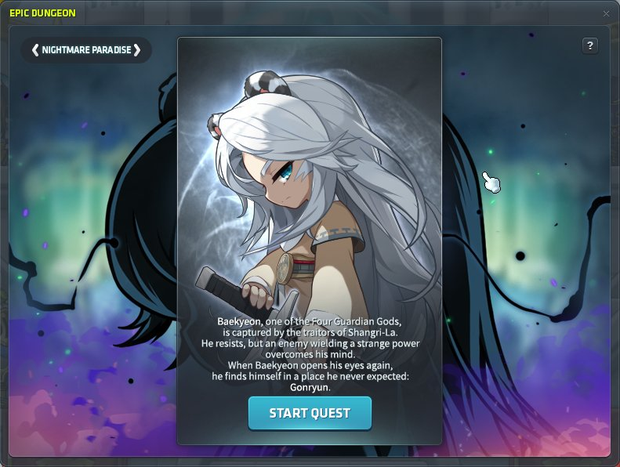
Developer Notes
A new Epic Dungeon, Nightmare Paradise, based on the story of Baekyeon, one of the Four Guardian Gods of Shangri-La, and the events encountered in the mortal realm, will open on April 9.
Maplers of Lv. 280 or higher can challenge this dungeon. A QTE system has been introduced to reduce clear time based on player skill, allowing for faster and smoother completions as you become more familiar with the mechanics.
Please note that, including the existing dungeons High Mountain and Angler Company, only up to two Epic Dungeons per MapleID can be completed per week.
- Available to character that are Level 280 and above that has completed [Arteria] Post War recovery and [Epic Dungeon] One Who Reached the Secrets of the Deep-Sea quest
- Speak to NPC Serajar in the Operation Headquarters and complete the '[Epic Dungeon] Nightmare Paradise' quest to access Story Mode.
- Upon completing the Nightmare Paradise Story Mode, the character used will unlock access to the Nightmare Paradise Dungeon and will be eligible to receive rewards upon clearing it.
- If the Story Mode has been cleared by any character under the same Maple ID, other characters within the same Maple ID may skip the Story Mode. However, if the Story Mode is currently in progress, skipping will not be available.
- The following quests have been added:
- [Epic Dungeon] Nightmare Paradise
- [Epic Dungeon] Night Chasing Shadows
- [Epic Dungeon] The Temple of Gathering Tears
- [Epic Dungeon] Ember of Life
- [Epic Dungeon] Nightmare Slayer
- The following medal have been added:
- Nightmare Slayer
- Achievements related to [Epic Dungeon] Nightmare Paradise have been added:
- [Epic Dungeon] Nightmare and Selection
- [Epic Dungeon] The Nightmare Begins
- [Epic Dungeon] The Repeating Nightmare

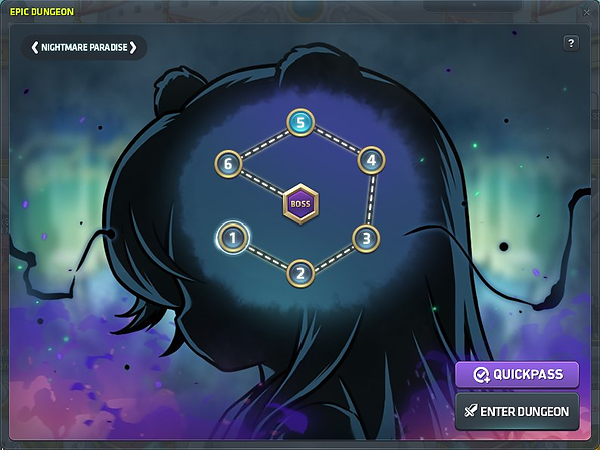
- The Nightmare Paradise Dungeon consists of 7 stages in total. If you exit mid-run, you may resume your attempt from the last stage you reached.
- Each MapleID can clear up to 2 Epic Dungeons per week.
- Epic Dungeons can only be played on the MapleID that first entered the dungeon that week.
- Each character is limited to clearing 1 dungeon per week.
- Reward for completing the dungeon:
- Experience
- 60x Sol Erda Fragment
- 2x Maple Gold Coin
- Sol Erda Fragments and Maple Gold Coins are Inter-Account Transactions only.
- Bonus Reward system similar to that of Epic Dungeon: High Mountain and Epic Dungeon: Angler Company has been applied.
- Maple Point cost per purchase for Epic Dungeon: Nightmare Paradise bonus reward is 5,000 Maple Points.
- EXP Bonus and Sol Erda Fragment Bonus can be purchased separately and can be obtained up to 10 times each.
- Each purchase of EXP Bonus and Sol Erda Fragment Bonus gives a chance to obtain random additional rewards.
- Each purchase of EXP Bonus and Sol Erda Fragment Bonus will increase the Fever Gauge by 25% and double the random additional rewards when fully filled.
[Go to Table of Content]
Union Champion Improvements
- An additional Champion slot will be unlocked.
- If you own 3 or more A-Grade (or higher) Champions, you will be able to unlock the 4th Champion slot.
- Union Champion-related Achievements will be added.
- Champion Raid: Dragon Island Changes:
- The control time per champion has been changed from 3 minutes to 1 minute and 40 seconds.
- The rate at which the Champion's Bond Gauge increases and decreases has been adjusted.
- The number of missions per stage has been adjusted from 10 to 5.
- The time between completing a mission and moving on to the next has been shortened.
- The monster summoning cycle for hunting missions has been shortened.
- Elite monsters will now be summoned in all hunting missions.
[Go to Table of Content]
Monster Collection Update

Developer Notes
With continuous updates, the Monster Collection has now surpassed 1,400 entries.
To reward Maplers who have diligently worked on completing their collection, a new achievement has been added. The Monster Collection has also been expanded to include the Zipangu region, making it easier to progress toward completion.
A total of 35 new monsters can now be added to the Monster Collection by hunting in Mushroom Shrine, Showa Town, and Ninja Castle.
If you still have many empty slots in your collection, why not head to Zipangu and begin your hunt?
- New Monster have been added to Monster Collection:
- Grandis
- Special
- Zipangu
- New Rewards have been added:
- Baekyeon Cube Chair
- First Adversary Cube Chair
- Baldrix Cube Chair
- Jade Warmaster Cube Chair
- Small Exploration Box
- Reasonable Exploration Box
- Good Exploration Box
- Considerable Exploration Box
- New Achievement has been added for Monster Collection after you have registered 1400 Monsters.
[Go to Table of Content]
World Archive
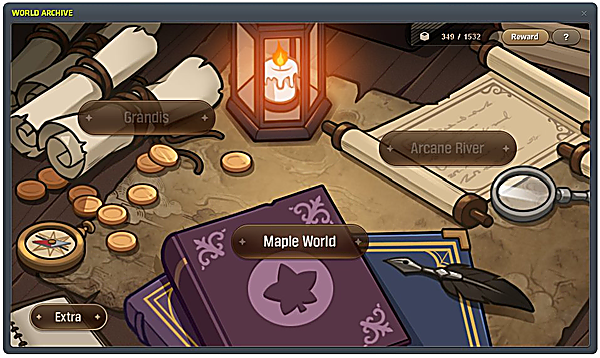
Developer Notes
The World Archive Project, which compiles information from across the world into a single book, now expands to Zipangu and Jianghu.
Information on the people and monsters of Zipangu, the floating island transferred from another world, and Jianghu, the mysterious martial arts continent, has been added to the archive.
Investigate various regions of Zipangu and Jianghu, complete the World Archive, and enjoy the stories recorded by the investigators.
Additionally, a page-turning function has been added for the special investigation records of important figures, allowing you to explore these entries in greater detail.
- Investigator Red & Investigator Dust- A new exploration begins in the Dimensional Library.
- Assist Thales in investigating monsters and NPCs across Maple World to complete the Collection.
- The World Archive is an account-based collection system, collected by Maple ID.
- Information on Maple World's monsters and NPCs is added to the Collection. Defeating a monster or interacting with an NPC automatically adds their information to the World Archive.
- Zipangu and Jianghu region are also been included!
How to Unlock
- The World Archive can be unlocked by completing the quests “[Dimensional Library] World Archive Project 1, 2 and 3”. Upon completion, the World Archive UI can be accessed via the Full Menu.
- The quests can be done by characters Lv. 100 and above who have completed “[Dimensional Library] Visit the Dimensional Library”, or by Zero characters who have completed Chapter 2 of the Story Quest, through NPC Librarian Thales.
- Quest progress is shared across all worlds and can only be completed once per Maple ID. These are the following quests:
- [Dimensional Library] Visit the Dimensional Library - Requirement Lv. 100
- [Dimensional Library] World Archive Project 1 - Requirement Lv. 100 and [Dimensional Library] Visit the Dimensional Library Complete
- [Dimensional Library] World Archive Project 2 - Requirement Lv. 100 and [Dimensional Library] World Archive Project 1 Complete
- [Dimensional Library] World Archive Project 3 - Requirement Lv. 100 and [Dimensional Library] World Archive Project 2 Complete
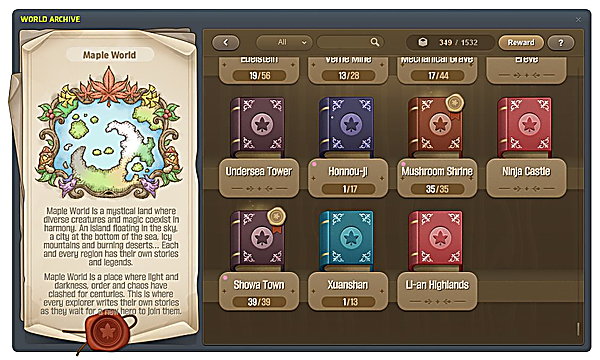
- The World Archive UI is designed to allow you to check the status of your Collection and explore information on monsters and NPCs in each region.
- You can choose between Maple World, Grandis, Arcane River, and Appendix. Clicking each button will take you to the corresponding world region selection screen.
- A list of regions belonging to the selected world will be displayed, and you can check the collection progress of each region.
- The Collection can be filtered by status (All / Incomplete / Completed) using the filter function, and can also be searched by region name or Collection item name.
- Monsters will be registered upon defeat. When in a party, you must deal damage to the monster at least once for it to be registered. (Monster not registered in Practice Mode)
- NPCs will be registered upon clicking or interacting with the NPC (including via the NPC/Gather key). Certain NPCs may provide hidden special research information, which can be uncovered through additional interactions.
- Clicking the notification window displayed when registering a collection will allow you to immediately check the collected collection information.
How to Use
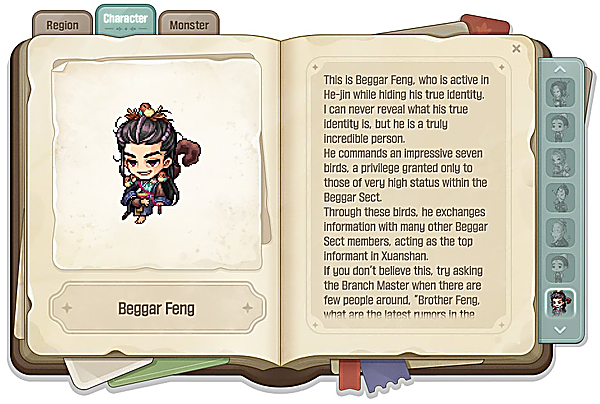
Enjoy the stories of World Archive!
[Go to Table of Content]
Maple Chronicle: Resistance
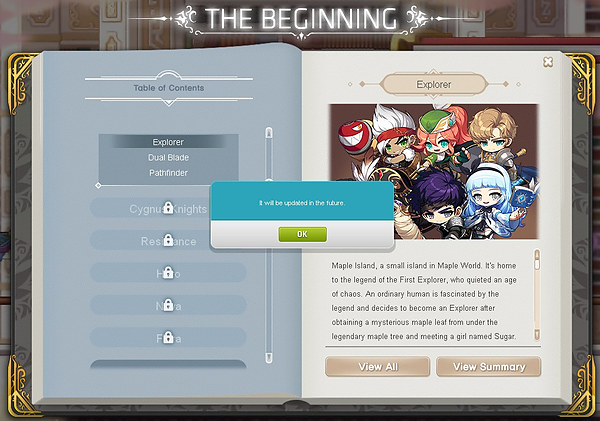
- Book of Beginning: Resistance in Maple Chronicle will be available in the future patch.
[Go to Table of Content]
HEXA Matrix Reset Scroll
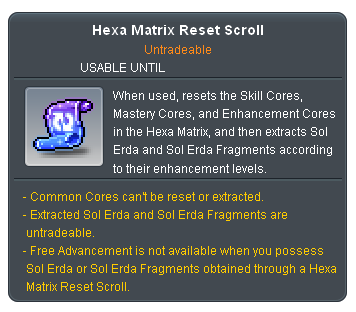
- The HEXA Matrix Reset Scroll has been added.
- This consumable item resets the HEXA Matrix Skill Core, Mastery Core, and Enhancement Core upon use, then extracts Sol Erda and Sol Erda Fragments appropriate to the enhancement level.
- Common cores are not reset or extracted.
- Extracted Sol Erda and Sol Erda Fragments are granted untradeable, and you cannot perform Free Class Advancement while holding these items.
- The HEXA Matrix Reset Scroll will be given to Jobs who requires Hexa Matrix skill reset due to Job Revamp and balancing. Details will be shared if a distribution is required.
- From v249 Update, all job characters will receive a HEXA Matrix Reset Scroll except Hayato, Kanna, Wild Hunter and Kinesis. Further details of the item distribution for these jobs will be shared in the future.
[Go to Table of Content]
Foggy Forest Training Center Improvements
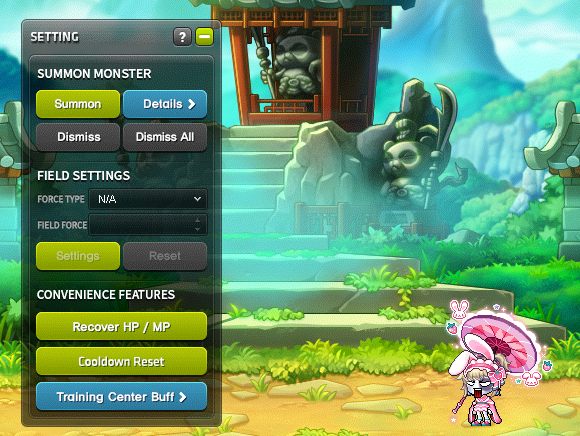
- The entry requirements and entry restrictions for Foggy Forest Training Center have been removed.
- Upon entering the Foggy Forest Training Grounds, all skill cooldowns (excluding certain skills) will be reset. Rechargeable skills, job gauges, and Soul Weapon souls will also be fully charged.
- Cooldowns are reset and the effects of charged skills are canceled.
- Upon exiting the Foggy Forest Training Grounds, skill cooldowns will be restored to their pre-entry state. Any charged skills, job gauges, and Soul Weapon souls will also be reset.
- All applied buff effects will be removed when entering the Foggy Forest Training Center. However, the buff effects below will not be removed:
- Consumption, Cash Item Effects
- On/Off Skills
- Summon Skills with No Cooldown and Maintain While Moving
- Noblesse Guild skills
- Weapon Refinement, Accessory Enhancement
- Symbol of Honor Chair Buff effects
- Champion's Protection
- A Cooldown Reset feature has been added to the Foggy Forest Training Center settings UI.
- This feature resets the cooldowns of all skills (except some) and fully charges rechargeable skills, job gauges, and soul weapons.
- Following buff effects of the skills below are not removed upon entry and the cooldown is not reset:
- Paladin's Combat Orders
- Pirate Roll of the Dice
- Viper's Time Leap
- Luminous' Crossroads of Fate
- Ark's Contact Caravan
- 5th Job Decent Sharp Eyes
- 5th Job Decent Hyper Body
- 5th Job Decent Combat Orders
- 5th Job Freud's Protection
[Go to Table of Content]
Copyright © 2025 NEXON Korea Corp. & Playpark Co Ltd. All Rights Reserved.