Guide
Download
Information
As of 3rd June 2026, the Playpark Downloader includes:
You are strongly advised to use the Auto Patcher if you have a pre-existing Game Client file of v248 to v250. (After the Maintenance) Otherwise, a Full Client download is required.
To run the Manual Patcher, kindly proceed with the following steps.
Step 1: Select the desired version of Manual Patch available. You may check the current version of your game clients by right-clicking the MapleStory.exe application > Details > File version.
Step 2: Right-click the .zip file, and extract all files accordingly. Upon entering the extracted folder path, ensure that you have a .patch file, as well as a MaplePatch Application (E.g. 00244to00245.patch + MaplePatch244to245.exe) within the same file directory.
Step 3: Click to run the MaplePatch application (Right-click to run as Administrator), and select the MapleStorySEA directory. (Default Path: C:\Program Files (x86)\Wizet\MapleStorySEA\)
Step 4: Wait for the Manual Patch to complete.
Common Errors when using Manual Patcher
Error Message: PatchData does not exists in directory. Would you like to find the correct files directly?
Solution: Ensure that the .patch file coincides with the same file path of the Patcher Application. Alternatively, you may select the .patch file destination to continue the process.
Error Message: Canvas.dll is corrupt.
Solution: Ensure that the version of Manual Patch used is correct. Otherwise, please uninstall and redownload the Full Client again.
Note:
- MapleStorySEA uses MapleStorySEA Passport and not PlayID. Please register for MapleStorySEA Passport, login and create your very own MapleID.
- If you are downloading Playpark Downloader using Internet Explorer, please rename the file extension from .man to .msi before executing it.
Links & Guides Visit Download Guide Visit Installation Guide Starting the Game Uninstallation Guide
Full Client (Official)
| Version | MD5 Sum | Size | Link |
|---|---|---|---|
| Playpark Downloader 0.3.6.1 | -- | -- | Download |
Full Client (Mirror Link)
| Version | MD5 Sum | Size | Link |
|---|---|---|---|
| v251.1 Setup.exe | 6235DFF634F409F9DC2A8325BC5425CE | -- | Download |
| v251.1 Full Client Part 1 | 4050F33488D55E6B2D3884EB78FD4AC5 | -- | Download |
| v251.1 Full Client Part 2 | 86FE300F0A08E9124C85C0D4B1375CD9 | -- | Download |
| v251.1 Full Client Part 3 | E2E72F2C8DC33FFB8E8DDE6F597CF32A | -- | Download |
| v251.1 Full Client Part 4 | A7335417F5E47256755C6DE153F0D54D | -- | Download |
| v251.1 Full Client Part 5 | 31EEB6737CC216CF31155F0517693236 | -- | Download |
| v251.1 Full Client Part 6 | DFE31039D202E60D99F3731144E8A304 | -- | Download |
| v251.1 Full Client Part 7 | 0AF4FB57B763419254DFB809163A5532 | -- | Download |
| v251.1 Full Client Part 8 | C647FF98EEDB92375A09A7299054EBA6 | -- | Download |
| v251.1 Full Client Part 9 | 26A03CA8FF360A9D5ED1FD7C52124B4D | -- | Download |
| v251.1 Full Client Part 10 | AC1D73389BCCDB638FF5AE4FDEFBBB51 | -- | Download |
| v251.1 Full Client Part 11 | A82B4A616DA3104D6C46687E5B5F3D72 | -- | Download |
| v251.1 Full Client Part 12 | 34D2CE1453F0A4F88D0153CB030B7C52 | -- | Download |
| v251.1 Full Client Part 13 | 7832CC39692C3E0F13273453910BD63B | -- | Download |
| v251.1 Full Client Part 14 | 728FCF6838E39FA4DAB1206F032B66A4 | -- | Download |
| v251.1 Full Client Part 15 | 40869BBF7A4DF34D53F532C57E3AFF78 | -- | Download |
| v251.1 Full Client Part 16 | 134BBB1D854FD7D393466BD56587308D | -- | Download |
| v251.1 Full Client Part 17 | 72D32E03EC6865058F5581BA10DE4869 | -- | Download |
| v251.1 Full Client Part 18 | 7BDEB39A19A43FF1BF284DAA4556ADDA | -- | Download |
| v251.1 Full Client Part 19 | CE1134D21695640E7EA08962DEF44628 | -- | Download |
| v251.1 Full Client Part 20 | DB977F62AAB1BC2C388C3B589E763896 | -- | Download |
| v251.1 Full Client Part 21 | CD894884D26017141A01ADD5FB0F5E23 | -- | Download |
| v251.1 Full Client Part 22 | 3CFE80FEF5528388C8E94F27D472303D | -- | Download |
| v251.1 Full Client Part 23 | 08781C4419E6C5EF5AC404287FAE3E82 | -- | Download |
| v251.1 Full Client Part 24 | 0DFB18C76D8B0D5DCAD39555551CFD43 | -- | Download |
| v251.1 Full Client Part 25 | 5F06B04A975D053961D5EF4FCF43C828 | -- | Download |
| v251.1 Full Client Part 26 | B9EB37E18E9C7EB176029614CFE76072 | -- | Download |
| v251.1 Full Client Part 27 | 06E0B902B6AA8BC99F627634E39E8A78 | -- | Download |
| v251.1 Full Client Part 28 | 884709F2EF943BDC7E94BFB2C7553957 | -- | Download |
| v251.1 Full Client Part 29 | FCF8BED20428FEC05C02581FCBD6BD95 | -- | Download |
| v251.1 Full Client Part 30 | 28FEB5A92005D65F9FB58184A0F5868D | -- | Download |
| v251.1 Full Client Part 31 | 2789D1B1618BAD0442BE56117FD84715 | -- | Download |
| v251.1 Full Client Part 32 | 39090AFF4C6E441B797C000DBD11F57B | -- | Download |
| v251.1 Full Client Part 33 | 512CD406BCF02E549E37AC638CEE6BEC | -- | Download |
Manual Patches
| Version | MD5 Sum | Size | Link |
|---|---|---|---|
| v251.2 Minor Patch (exe) | 1656310571431fa436d50d8d79aaef13 | -- | Download |
| v250.2 to v251.1 (.zip) | 5524E32C1AEE124FCBCB213C10D58CBA | -- | Download |
| v249.3 to v251.1 (.zip) | F65177702A0ADF5264E4E45881C96082 | -- | Download |
| v248.2 to v251.1 (.zip) | A1D95D46EBBB9CC802129E24A7EC8D01 | -- | Download |
BlackCipher Files
| Version | MD5 Sum | Link |
|---|---|---|
| BlackCipher.zip (v251) | 6A1C3CEB76D0431CD457AE97D2B7549D | Download |
Description
Should you face any NGS related issues (0xE3010201, 0xE3010401), you may download these files and follow the below instructions:
- Step 1
- Download the BlackCipher.zip file from the above link.
- Step 2
- Right click the zip file and select 'Extract here'.
- Step 3
- Locate the BlackCipher folder in the same directory after the extraction.
- Step 4
- Copy and replace the entire BlackCipher folder to your MapleStory directory (Default Path: C:\Program Files (x86)\Wizet\MapleStorySEA\)
SYSTEM REQUIREMENTS
Recommended Setting (Effective 3rd June 2026, after v251 Patch update)
| System | Minimum Requirements | Recommended Requirements |
| OS | Windows 10 (64 bit) | Windows 10 (64 bit) |
| CPU | Intel Core i3 3.4 GHz (7th Gen) / AMD Ryzen 3 3.4 GHz | Intel Core i5 4.1 GHz (10th Gen) / AMD Ryzen 7 4.2 GHz |
| RAM (Memory) | 16 GB | 16 GB and above |
| Storage | 65 GB (SSD) | 65 GB and above (SSD) |
| Graphic Card | GeForce GTX 16 Series / AMD Radeon 570 Series | GeForce RTX 30 Series / AMD Radeon 6000 Series |
| Direct X | 11.0 or later | 11.0 or later |
| Network | High-speed Broadband Internet | Fibre-optic Internet |
- 32-bit Operating Systems are no longer supported.
- Running MapleStorySEA on Solid State Drive (SSD) is highly recommended for improved and smoother responsive gameplay.
- During the installation and patching process, you may require more storage space. You are advised to have at least 130 GB of available storage space.
- Install the latest DirectX compatible for your system.
UTILITY
| FlashGET Download If you experience any disruptions to your download, please consider using FlashGet. This program will enable you to resume your downloads from where they last ended. |
WinZip Download WinZip is a shareware file archiver and compressor for Windows, OS X, iOS and Android developed by WinZip Computing. By default, WinZip creates archives in Zip file format but also has various levels of support for other archive formats. |
| WinRAR Download WinRAR is a powerful archive manager. It can backup your data and reduce the size of email attachments, decompress RAR, ZIP and other files downloaded from Internet and create new archives in RAR and ZIP file format. |
WinMD5Free Download WinMD5Free is a tiny and fast utility to compute MD5 hash value for files. It works with Microsoft Windows 98, Me, 2000, XP, 2003, Vista and Windows 7. |
| DirectX End-User Runtime Web Installer Download The Microsoft DirectX® End-User Runtime provides updates to 9.0c and previous versions of DirectX — the core Windows® technology that drives high-speed multimedia and games on the PC. |
Nvidia GeForce Graphics Card Driver Download Update your Nvidia GeForce graphics card driver here. |
| AMD Graphics Card Driver Download Update your AMD graphics card driver here. |
Realtek Audio Driver Download Update your Realtek Audio driver here. |
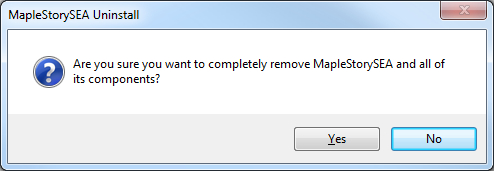
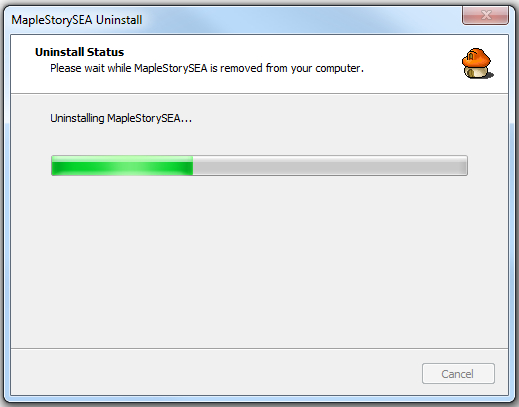
How to uninstall
Go to and run:
Default Path: C: -> Program Files(x86) -> Wizet -> MapleStorySEA -> unins000.exe file.



Copyright © 2025 NEXON Korea Corp. & Playpark Co Ltd. All Rights Reserved.